

I used Midjourney and Leonardo AI for similar image-generation tasks, including blog covers, cinematic concepts, product-style visuals, character ideas, and social media graphics. Both tools can create impressive AI images, but they do not feel the same once you actually work with them.
Midjourney felt stronger when I wanted a polished image quickly. Leonardo AI felt stronger when I wanted more control over the image, especially after the first result. That became the clearest difference for me: Midjourney is better for visual impact, while Leonardo AI is better for controlled creative workflow.
Quick Verdict
After using both tools, I would not call one universally better. Midjourney is the better choice when the goal is a cinematic, artistic, or high-impact image. Leonardo AI is the better choice when the image needs editing, consistency, model control, or a more production-style process.
| Area | Better Choice | My Experience |
| First-look image quality | Midjourney | It gave me more polished images with less effort. |
| Creative control | Leonardo AI | I had more ways to guide, adjust, and refine the image. |
| Prompting | Midjourney | Strong prompts produced stronger artistic results. |
| Editing workflow | Leonardo AI | It was easier to keep working after generation. |
| Cinematic visuals | Midjourney | Lighting, mood, and composition felt stronger. |
| Game and design assets | Leonardo AI | It felt more useful for repeatable asset work. |
| Fast creative output | Midjourney | I got usable covers and concepts faster. |
The simplest way I can explain it is this: Midjourney feels like asking a visual artist to interpret your idea. Leonardo AI feels like working inside a creative tool where you can keep adjusting the result.
Feature Comparison: Focused Generator vs Broader Creative Workspace
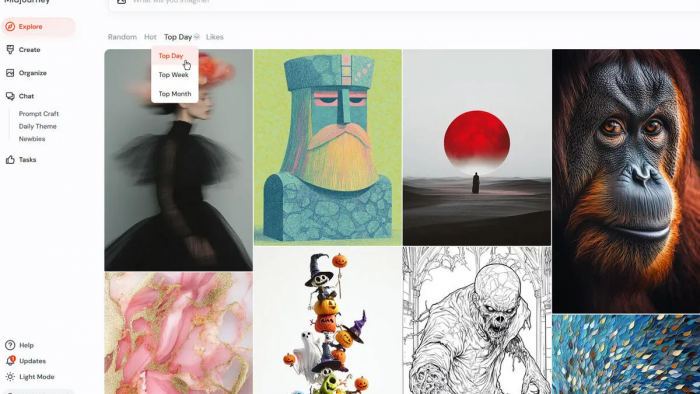
Midjourney feels focused. Its main job is to generate strong images from prompts, references, variations, and upscaling. I liked that because the workflow did not feel crowded. I could describe the image, compare the results, choose a direction, and refine from there.
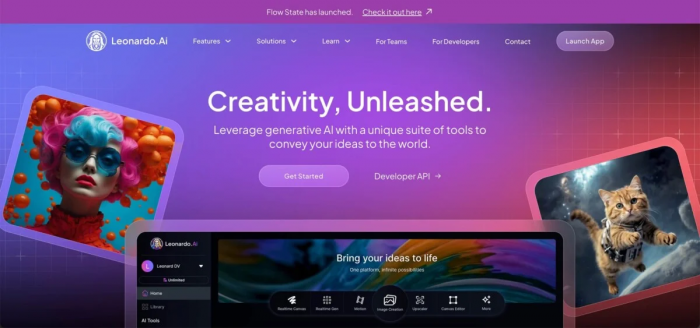
Leonardo AI feels broader. It gives you more visible options before and after generation. I could choose models, use styles, adjust settings, apply image guidance, edit results, upscale outputs, and work toward a more specific final image. That flexibility is useful, but it also means you spend more time making decisions.
| Feature Area | Midjourney | Leonardo AI |
| Text-to-image generation | Excellent | Excellent |
| Image references | Strong | Strong |
| Style control | Strong through prompts and references | Strong through models, styles, and settings |
| Editing tools | Useful, but not the main focus | More central to the platform |
| Upscaling | Available | Available |
| Background editing | More limited | More practical |
| Model options | Less visible to regular users | More flexible |
| Best feature advantage | Image quality | Workflow control |
When I wanted a strong visual direction, Midjourney felt easier. When I wanted to control the image step by step, Leonardo AI felt more useful.
User Interface: Midjourney Is Cleaner, Leonardo AI Is More Hands-On
Midjourney’s interface felt cleaner because most of the work happens through the prompt and the generated options. I wrote a prompt, checked the outputs, picked the strongest one, made variations, and upscaled the final image. Once the flow made sense, it felt fast and distraction-free.
Leonardo AI felt more like a creative dashboard. There were more models, settings, tools, and adjustment paths. That made it better for controlled work, but it also felt busier. I had to think more before generating the image.
In daily use, this difference mattered. Midjourney felt smoother when I already had a visual idea in mind. Leonardo AI felt better when I needed more visible controls instead of relying only on prompt writing.
A few things stood out during use:
● Midjourney felt faster when I wanted a dramatic image without adjusting too many settings.
● Leonardo AI felt better when I needed visible controls, model choices, and editing options.
● Midjourney rewarded stronger prompt writing more clearly.
● Leonardo AI gave me more ways to fix or guide the image after generation.
So, the better interface depends on how you like to work. If you prefer prompt-first creation, Midjourney feels smoother. If you prefer settings, models, and editing controls, Leonardo AI feels easier to manage.
Prompting Experience: Midjourney Rewards Better Prompts, Leonardo AI Gives More Support
Prompting mattered more in Midjourney. A basic prompt could still create a good image, but a detailed visual prompt usually performed much better. When I added lighting, camera angle, mood, color palette, texture, and composition, Midjourney responded strongly.
Leonardo AI also depends on prompts, but the prompt does not have to carry the whole result. Model choices, styles, guidance tools, and editing options help shape the image. That made Leonardo AI feel more forgiving when I knew what I wanted but did not want to describe every detail in the prompt.
Prompt Test 1: Cinematic Blog Cover
Prompt I used:
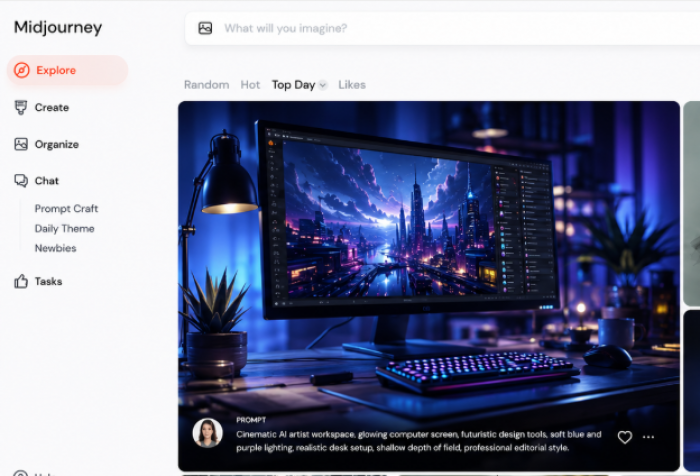
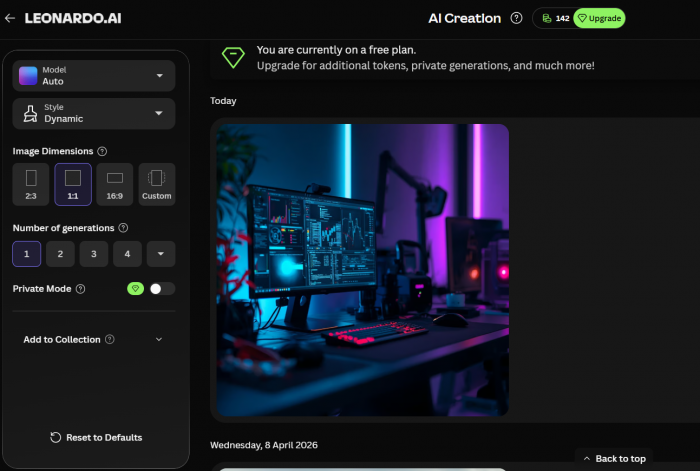
“Cinematic AI artist workspace, glowing computer screen, futuristic design tools, soft blue and purple lighting, realistic desk setup, shallow depth of field, professional editorial style.”
What Midjourney gave me:
Midjourney produced the more dramatic image. The lighting looked richer, the workspace had more depth, and the final image felt closer to a premium blog cover. It added atmosphere even where the prompt was not extremely specific.
What Leonardo AI gave me:
Leonardo AI produced a cleaner and more controlled workspace. The result looked practical and usable, but it did not have the same cinematic punch on the first try. It became more useful when I started adjusting the style and settings.
My takeaway:
For a blog cover or thumbnail, I would start with Midjourney.
Prompt Test 2: Product-Style Marketing Image
Prompt I used:
“Minimal skincare product bottle on a clean marble surface, soft natural light, pastel background, realistic commercial photography, premium brand aesthetic, sharp focus.”
What Midjourney gave me:
Midjourney created a beautiful image, but it added more artistic styling than I wanted. The result looked premium, but some details felt less controlled for a product-style layout.
What Leonardo AI gave me:
Leonardo AI gave me a more usable commercial-style result. The product placement felt easier to control, and the image was better suited for a clean marketing visual.
My takeaway:
For product-style images and marketing assets, Leonardo AI felt more reliable.
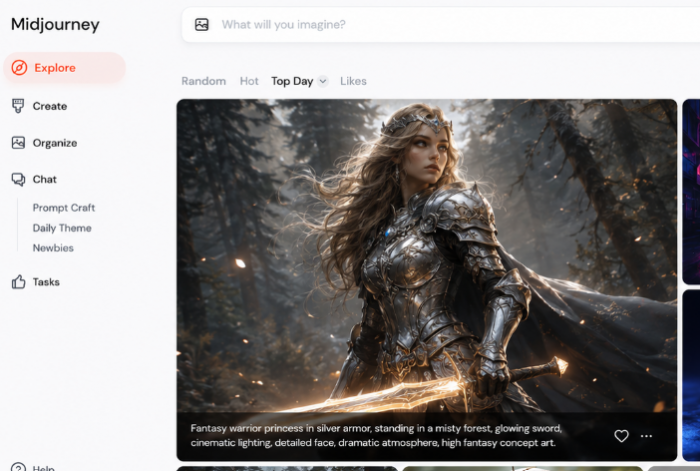
Prompt Test 3: Fantasy Character Concept
Prompt I used:
“Fantasy warrior princess in silver armor, standing in a misty forest, glowing sword, cinematic lighting, detailed face, dramatic atmosphere, high fantasy concept art.”
What Midjourney gave me:
Midjourney produced the stronger artistic image. The armor, lighting, forest mood, and cinematic atmosphere looked more polished. It felt like a fantasy poster rather than a rough concept.
What Leonardo AI gave me:
Leonardo AI created a good character concept, but I needed more adjustment to reach the same level of drama. Its advantage was control. It felt better if I wanted to build a consistent character set instead of one standout image.
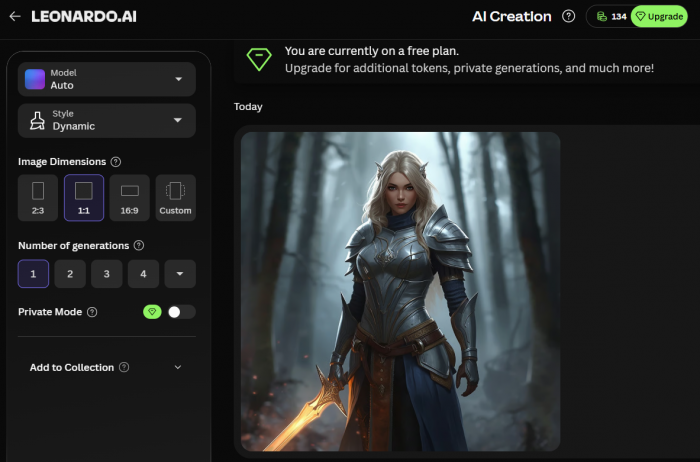
My takeaway:
For one powerful fantasy concept, Midjourney was better. For repeated character work, Leonardo AI was more practical.
| Prompting Area | Midjourney | Leonardo AI |
| Prompt importance | Very high | Medium to high |
| Best prompt style | Visual, cinematic, and detailed | Clear prompt plus model and settings |
| Beginner comfort | Takes more practice | Feels more guided |
| Creative interpretation | Stronger | More controlled |
| Editing after prompt | More limited | Easier to continue refining |
| Best for | Artistic exploration | Controlled generation |
After testing prompts in both, I felt Midjourney was better at interpreting mood and style. Leonardo AI was better when I wanted to control the image beyond the prompt.
Workflow: Midjourney Is Faster for Exploration, Leonardo AI Is Better for Production
Midjourney’s workflow felt quicker when I was exploring ideas. I could write a prompt, see several directions, choose the best one, make variations, and upscale. This worked well for blog covers, thumbnail ideas, posters, and visual concepts.
Leonardo AI took more setup, but it gave me a better production workflow. I could choose a model, adjust settings, add references, edit the result, and continue shaping the image after generation. That made it more useful when the final image had to meet a specific purpose.
My Midjourney workflow usually looked like this:
1. I wrote a visual prompt with mood, subject, lighting, and style.
2. I generated several image options and picked the strongest direction.
3. I created variations when the image was close but not perfect.
4. I upscaled the best result and refined only if needed.
My Leonardo AI workflow usually looked like this:
1. I selected a model or style before generating the image.
2. I wrote the prompt and adjusted settings around the output I wanted.
3. I used references or guidance when the image needed a specific direction.
4. I edited, refined, upscaled, or reused the result inside the workflow.
Midjourney helped me reach a strong image faster. Leonardo AI helped me stay in control for longer.
Creative Control and Editing: Leonardo AI Feels More Practical
Midjourney gives control through prompts, references, parameters, and variations. That works well, but it still feels indirect. I had to guide the tool, wait for the result, and then decide whether to regenerate, vary, or upscale.
Leonardo AI felt more practical when I wanted to control the process after the first image appeared. I had more ways to choose the style, guide the output, edit the image, and refine the final result. This was useful when the image needed to match a campaign, product, character, or brand direction.
The difference became clear when I needed changes. In Midjourney, I often had to prompt again or create variations. In Leonardo AI, I had more options to keep working on the existing image.
This made Leonardo AI more useful for brand visuals, product-style images, game assets, reusable character styles, marketing creatives, and design mockups. Midjourney gave me better surprises, but Leonardo AI gave me better control.
Output Quality: Midjourney Gives the Stronger First Impression
When I compared final images, Midjourney usually gave me the stronger first impression. The images looked more cinematic, more atmospheric, and more polished. Lighting, depth, color, and composition were often better without much adjustment.
This was most obvious in fantasy scenes, cinematic portraits, editorial covers, and thumbnail-style visuals. Midjourney often understood the emotional tone of the prompt better. It added drama without needing too much setup.
Leonardo AI also produced good images, but the result depended more on the selected model and settings. When I used the right setup, it created clean and usable visuals. But if I wanted pure visual impact, Midjourney usually got there faster.
| Quality Factor | Better Choice | My Experience |
| Cinematic look | Midjourney | The lighting and atmosphere were stronger. |
| Artistic polish | Midjourney | First outputs looked more finished. |
| Fantasy visuals | Midjourney | The mood and imagination were better. |
| Editorial covers | Midjourney | The images felt more story-driven. |
| Brand-style visuals | Leonardo AI | The workflow gave me more consistency. |
| Game assets | Leonardo AI | The control was more useful for production. |
| Product visuals | Leonardo AI | The output was easier to guide. |
| Repeatable image sets | Leonardo AI | It was more practical for ongoing work. |
My quality verdict is simple: Midjourney gave me better-looking images faster. Leonardo AI gave me more control over images that needed refinement.
Accuracy and Consistency: Leonardo AI Is Better When Details Matter
Midjourney can create beautiful images, but it sometimes takes creative freedom. That can be great when I want artistic interpretation. It becomes frustrating when I need exact object placement, repeated character features, or a specific product-style layout.
Leonardo AI felt better when details mattered. Because I had more model and editing control, I could push the image closer to the intended result. It was not perfect every time, but the workflow gave me more ways to correct mistakes.
For one-off visuals, I preferred Midjourney. For repeated assets, I preferred Leonardo AI. Midjourney may create the best single image, but Leonardo AI is better when you need a consistent set.
Speed and Productivity: It Depends on the Job
Midjourney felt faster when I needed one beautiful image. I could enter a prompt and often get something usable within the first few generations. That speed is valuable for blog covers, thumbnail ideas, and creative inspiration.
Leonardo AI took more setup, but it became faster when the task required a workflow. If I needed multiple images in the same style, edited outputs, or assets with specific requirements, Leonardo AI saved time because I could continue working inside the platform.
| Speed Need | Better Choice | Why |
| Fast beautiful first draft | Midjourney | It needed less setup. |
| Fast idea exploration | Midjourney | It was better for visual brainstorming. |
| Fast editing after generation | Leonardo AI | The refinement tools were more useful. |
| Fast asset production | Leonardo AI | It offered more control across outputs. |
| Fast social media visuals | Both | The better choice depends on style versus control. |
| Fast campaign workflow | Leonardo AI | It was better for repeated visuals. |
Midjourney was faster for inspiration. Leonardo AI was faster when the image needed continued work.
Pricing Comparison: Leonardo AI Has a Free Plan, Midjourney Starts as Paid
Pricing is one of the clearest differences between Midjourney and Leonardo AI. Midjourney is simpler because it is built around paid subscription tiers. Leonardo AI is more flexible because it offers a free plan with daily tokens, then paid plans for heavier use.
At the time of writing, Midjourney starts at $10 per month for the Basic plan. Its higher plans are $30 per month, $60 per month, and $120 per month. Annual billing reduces the monthly equivalent to about $8, $24, $48, and $96 per month.
Leonardo AI starts with a Free plan at $0 per month, which includes daily tokens for casual testing. Its paid plans are currently $12 per month for Apprentice, $30 per month for Artisan, and $60 per month for Maestro. With annual billing, those prices usually drop to about $10, $24, and $48 per month.
| Plan Level | Midjourney | Leonardo AI |
| Free plan | No regular free plan | Free plan at $0/month with daily tokens |
| Entry paid plan | Basic at $10/month, or about $8/month annually | Apprentice at $12/month, or about $10/month annually |
| Mid-tier plan | Standard at $30/month, or about $24/month annually | Artisan at $30/month, or about $24/month annually |
| Higher plan | Pro at $60/month, or about $48/month annually | Maestro at $60/month, or about $48/month annually |
| Top plan | Mega at $120/month, or about $96/month annually | Team and enterprise options may vary |
| Usage model | Subscription with GPU time and generation modes | Token-based plans with monthly or daily token limits |
From my experience, Midjourney feels worth paying for if image quality is the main priority. Even the lower plans can make sense for creators who regularly need blog covers, thumbnails, posters, editorial images, or concept visuals. The main thing to watch is usage. The Basic plan can feel limited if you generate a lot of images, while Standard becomes more practical because it includes more fast GPU time and Relax Mode.
Leonardo AI feels better for people who want to test before paying. The free plan makes it easier to explore the tool without committing immediately. Once you move into paid plans, the value comes from the broader workflow: image generation, model choices, editing tools, upscaling, background removal, and more control over production assets.
The pricing difference also reflects the product difference. Midjourney charges for a focused, high-quality image-generation experience. Leonardo AI charges for a more flexible creative workspace.
If I were choosing based only on cost, Leonardo AI is easier to start with because of the free plan. If I were choosing based on image quality per paid subscription, Midjourney feels stronger for creators who mainly want polished visuals. If I needed editing, models, and workflow tools in the same platform, Leonardo AI would give me better overall value.
In simple terms, choose Midjourney if you are comfortable paying for stronger image quality. Choose Leonardo AI if you want a free starting point and a more flexible paid workflow.
Best Use Cases: Where I Would Use Each Tool
After using both, I would not use them for the same jobs. Midjourney is the one I would open for dramatic, polished, and high-impact visuals. Leonardo AI is the one I would open for controlled assets, marketing visuals, and repeatable design work.
| Use Case | Better Choice | My Reason |
| Blog cover images | Midjourney | The images had stronger visual impact. |
| YouTube thumbnails | Midjourney | The drama and mood were better. |
| Game assets | Leonardo AI | The production control was more useful. |
| Brand visuals | Leonardo AI | The workflow made consistency easier. |
| Fantasy art | Midjourney | The artistic output was stronger. |
| Product-style visuals | Leonardo AI | The results were easier to control. |
| Marketing creatives | Leonardo AI | Editing and reuse were more practical. |
| Concept art | Midjourney | Visual exploration was faster. |
| Social media images | Both | Midjourney is better for style, while Leonardo AI is better for control. |
| Repeatable asset sets | Leonardo AI | It worked better for ongoing creative production. |
For one standout visual, I would usually choose Midjourney. For a set of related visuals, I would choose Leonardo AI.
Limitations: What Frustrated Me in Both Tools
Midjourney frustrated me when I wanted exact control. Sometimes the image looked beautiful but missed a specific detail. I would get a great composition, but the object placement, character consistency, or product-like accuracy needed more retries.
Leonardo AI frustrated me in a different way. It gave me more control, but that also meant more setup. The results depended heavily on the model, settings, and workflow. If I wanted something instantly cinematic, Midjourney usually felt easier.
Midjourney’s weakness is precision. Leonardo AI’s weakness is setup. If you enjoy regenerating until you get a stunning image, Midjourney feels exciting. If you prefer shaping the image step by step, Leonardo AI feels more reliable.
Who Should Choose Midjourney?
I would choose Midjourney if the main goal is visual impact. It is better for images that need strong lighting, mood, composition, and artistic style.
Midjourney makes more sense if you create blog covers, YouTube thumbnails, posters, fantasy scenes, moodboards, editorial visuals, concept art, or dramatic social media images. I would especially recommend it to creators who enjoy prompt writing and want the AI to interpret ideas creatively.
Who Should Choose Leonardo AI?
I would choose Leonardo AI if the main goal is control. It is better for users who want to guide the image, edit it, test models, create variations, and reuse visuals across projects.
Leonardo AI makes more sense if you create game assets, brand visuals, marketing creatives, product-style images, character sets, reusable design assets, campaign visuals, or AI images that need editing after generation. I would especially recommend it to designers, marketers, and creators who need more than one nice image.
Final Verdict: Midjourney for Better Images, Leonardo AI for Better Control
After using both tools, my choice depends on the job. If I want the best-looking image quickly, I choose Midjourney. It gives stronger first results, better cinematic style, and more polished artistic output with less effort.
If I want more control over the image-making process, I choose Leonardo AI. It gives me more editing options, model flexibility, and workflow tools, which makes it better for production-style work.
So the final answer is simple: choose Midjourney if you want stronger visual impact, and choose Leonardo AI if you want more control over how the image is created, edited, and reused.
For artists, storytellers, bloggers, and thumbnail creators, Midjourney feels like the stronger creative engine. For designers, marketers, game creators, and teams working on repeatable visuals, Leonardo AI feels like the more practical production tool.
Comments