

Akool AI looks simple from the outside, but it is not a simple AI avatar tool anymore. It now sits across avatar videos, face swap, image-to-video, video translation, talking photos, voice tools, and AI video editing. That makes it useful for creators and businesses, but it also makes the platform harder to judge because every feature does not perform with the same level of consistency.
This review takes a practical look at Akool AI’s tools, workflow, output quality, pricing, user feedback, and limitations. The goal is not to praise or dismiss it, but to understand where it actually fits.
Quick Review Snapshot
| Area | Practical Take |
| Overall position | A broad AI video suite built around avatars, face swap, translation, and human-led content |
| Best use case | Marketing videos, training clips, talking photos, localized videos, and creator content |
| Main advantage | Combines multiple AI video workflows in one dashboard |
| Main drawback | Credit usage and output consistency need careful testing |
| Ease of use | Simple for individual tools, but the full platform can feel busy at first |
| Output quality | Strong with clean faces, clear scripts, and stable footage |
| Pricing | Free plan available, paid plans commonly start around $21/month, but credit usage affects real cost |
| Better for | Creators, marketers, educators, agencies, and business teams |
Akool AI is strongest when the content involves a person, face, presenter, voice, or translated speaker. It is less convincing when judged as a pure cinematic AI video generator, where tools like Runway, Kling, Pika, or PixVerse may feel more focused.
Akool’s Real Position: Not Just Avatar, Not Fully Cinematic
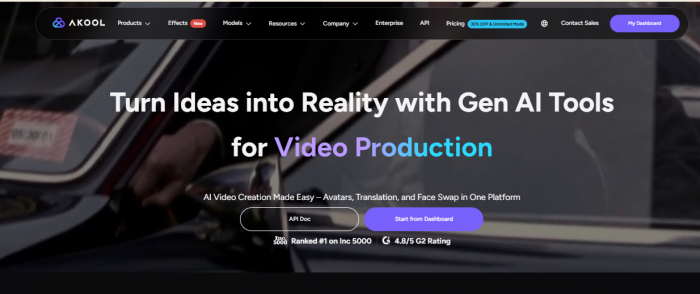
Akool is best understood as a human-centered AI video production suite. It is not only a talking avatar platform like Synthesia or HeyGen. It is also not only a cinematic AI video generator like Runway or Kling. It sits somewhere between these categories.
That middle position is useful because one user can create an avatar video, swap a face, translate a video, animate a photo, generate an image, and edit video assets inside the same ecosystem. For marketers, agencies, educators, and small business teams, that convenience matters.
But this also creates a problem. Akool tries to cover many jobs at once. Some tools feel polished, while others depend heavily on input quality and may need multiple attempts. This is why Akool should not be reviewed as one single feature. It should be judged as a bundle of connected AI media tools.
1. Avatar and Presenter Tools
Akool’s avatar tools are among its most important features. The platform offers talking avatars, avatar videos, streaming avatars, custom instant avatars, and studio avatar options on higher plans. These tools are meant for videos where a digital presenter speaks a script, explains a product, trains employees, or appears in a marketing video.
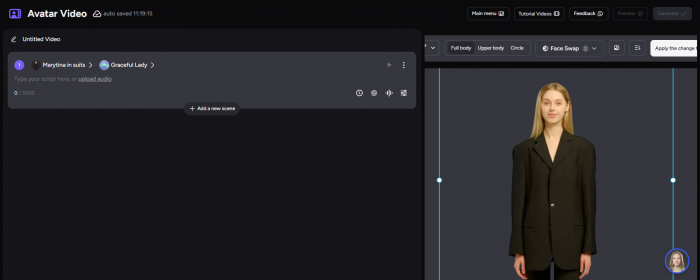
This is useful for teams that do not want to record a human presenter every time they need a video. A product demo, onboarding clip, course module, or internal update can be produced without booking a camera setup, studio, editor, and voice actor.
The practical value is clear:
● A marketer can create a short product explainer without filming a spokesperson.
● A trainer can turn internal notes or slides into a presenter-led video.
● A creator can publish talking-head content without appearing on camera.
● A business can make multilingual avatar videos for different markets.
The limitation is that avatar realism still depends on the selected model, script, voice, and facial delivery. Some avatar outputs look professional enough for internal training or basic brand videos, but they may still feel synthetic in emotional delivery. This matters if the video is for a premium ad campaign or a high-trust customer-facing message.
2. Face Swap and Identity Tools
Face swap is one of Akool’s most visible strengths. It supports both image and video face swap, and Akool also lists related identity tools such as head swap, character swap, and hair swap. This puts Akool in a different category from avatar-only platforms.
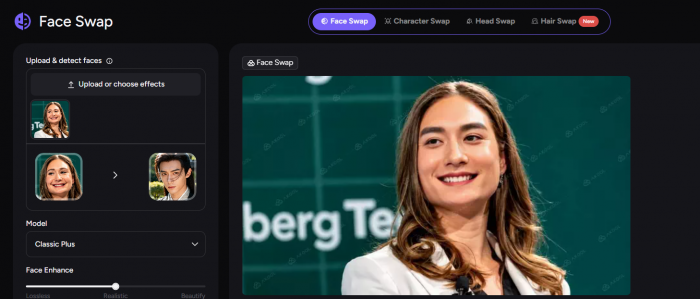
The face-swap workflow is useful for creative campaigns, personalized video experiments, character-based visuals, social media edits, and marketing variations. When the source face and target footage have similar lighting, angle, and expression, the output can look strong.
But face swap is also one of the areas where users should be careful. Output can weaken quickly when the video includes fast motion, side angles, hair obstruction, poor lighting, heavy compression, or changing facial expressions. These are not small issues because face swap quality is highly visible. A slightly wrong lip line, skin blend, or eye movement can make the whole clip feel artificial.
There is also a consent issue. Because Akool works with faces, voices, and realistic human likenesses, it should only be used with permission. Brands should be especially careful when using employee faces, influencer likenesses, customer images, or celebrity-style references.
3. Video Generation and Image-to-Video
Akool now includes video-generation tools such as text-to-video, image-to-video, video-to-video, and reference-to-video. This is important because it changes how the platform should be described. Akool is not only a face-swap or avatar product. It is also part of the broader AI video generator market.
Still, this part of Akool needs a careful review. Its video generation tools are useful for short clips, product visuals, social posts, ad concepts, and motion experiments. They are not always the best option for users who want cinematic control, detailed camera movement, highly stylized scenes, or complex prompt-following.
Image-to-video is likely to be more useful for many everyday users because it starts with a controlled visual input. If the image is sharp, well-lit, and has a clear subject, the generated motion can be more predictable. Text-to-video is more open-ended, but also more likely to miss details from complex prompts.
A fair reading is this: Akool’s video generation features add useful creative range, but they are not the only reason to choose the platform. Its stronger identity is still around people, avatars, faces, translation, and business-style video production.
4. Video Translation and Localization
Video translation is one of Akool’s most practical business features. It helps users translate existing videos into other languages and supports lip-sync style output. Akool’s pricing comparison mentions support for more than 155 languages, which makes this feature relevant for global creators, online educators, training teams, and brands.
This is where Akool can save real production time. Instead of recording the same video again in different languages, a creator can localize the original version. That can help with YouTube videos, product explainers, internal training, course content, and international campaigns.
The quality will still depend on the original audio, speaker clarity, language pair, voice choice, and lip-sync accuracy. It should not be treated as a perfect replacement for professional localization in every case. But for teams that need fast multilingual video drafts, Akool’s translation workflow is one of its stronger use cases.
5. Talking Photo, Voice, Background, and Editing Tools
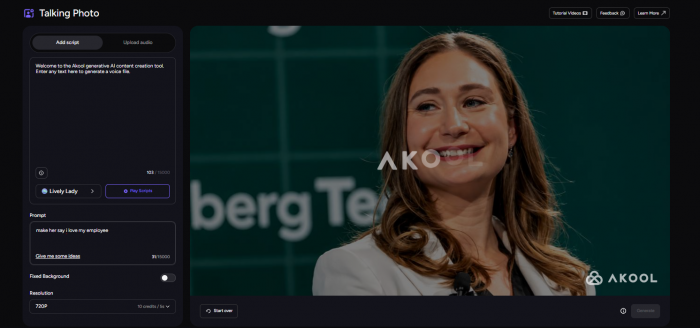
Akool also includes talking photo, image generation, background change, text-to-speech, voice clone, voice changer, voice generator, and an AI video editor. These features make the platform feel more complete, but they should be described as supporting tools rather than equal headline features.
Talking photo is useful for short social clips, character content, historical image storytelling, or quick promotional visuals. Background change can help with cleaner product visuals or campaign assets. Image generation can support thumbnails, concepts, and ad creatives. Voice tools add flexibility for narration and avatar workflows.
The AI video editor helps users bring some of these outputs together, but it should not be confused with a full editing suite like Premiere Pro, DaVinci Resolve, Final Cut Pro, or even CapCut. Akool is better for AI-assisted generation and assembly than deep frame-level editing.
Workflow: Simple Tool Steps, Slightly Crowded Platform
Akool’s workflow is mostly tool-based. You do not begin with one blank editing canvas. You usually start by choosing a specific tool: face swap, talking avatar, image-to-video, video translation, talking photo, or another option.
The usual workflow looks like this:
1. Choose the tool that matches the task.
2. Upload an image, video, face, document, or audio.
3. Add a script, prompt, language, voice, or avatar.
4. Adjust the available settings.
5. Generate the result.
6. Review, regenerate if needed, then export.
This makes Akool easy for non-editors. A user does not need to understand masking, keyframes, manual lip sync, or timeline editing to create a usable video. The platform’s guided tool structure is one reason it receives positive usability feedback on review sites.
The weak point is navigation. Because Akool now has many overlapping tools, the first-time user may not immediately know whether to choose avatar video, talking avatar, talking photo, image-to-video, or text-to-video. The individual tools are not difficult, but the product library can feel busy.
Output Quality: Good With Clean Inputs, Less Reliable With Messy Ones
Akool’s output is strongest when the input is controlled. A front-facing portrait, clear lighting, simple background, stable video, and clean audio can make a major difference. This is especially true for talking photo, face swap, avatar video, and image-to-video workflows.
The best output areas are:
● Avatar videos: Good for explainers, internal training, demos, and short business videos.
● Face swap: Strong when lighting, angle, and expression match well.
● Video translation: Useful for repurposing existing videos into other languages.
● Talking photo: Good for quick social videos and character-style content.
● Image-to-video: Works better when the source image has a clear subject.
Where Akool becomes less reliable is in complex scenes. Fast motion, low-resolution faces, side angles, shadows, vague prompts, and poor audio can all reduce the final quality. This is not unique to Akool, but it matters because Akool markets itself as a broad professional AI video suite.
For casual creators, a few uneven generations may be acceptable. For agencies or businesses producing client-facing content, failed attempts also affect cost because repeated generation can consume credits.
Pricing: The Plan Price Is Only Part of the Cost
Akool’s pricing needs more attention than a normal subscription tool because the platform uses credits. Capterra lists three public pricing plans: Free at $0, Pro at $21, and Pro Max at $79. The free plan includes limited usage, while the paid plans increase avatar limits, file upload size, and processing capability.
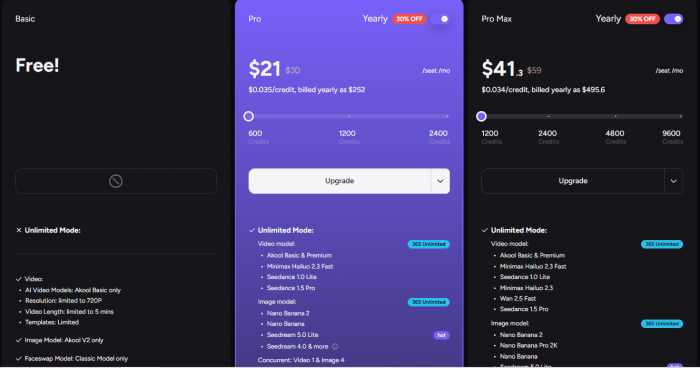
The pricing table tells only part of the story. The real cost depends on credits, resolution, video length, model choice, and how many times the user regenerates.
Akool’s API pricing gives a clearer look at how credits can be consumed. Talking Avatar is listed at 5 credits per 10 seconds for 1080p and 10 credits per 10 seconds for 4K. Video Translation is listed at 1 credit per 5 seconds. Talking Photo is listed at 10 credits per 5 seconds. Image Face Swap costs 4 credits per image, while Video Face Swap costs 10 credits per 10 seconds. Background Change costs 4 credits per image, and Image Generator costs 8 credits per image.
This matters because a plan may look affordable at first, but the cost depends on what users actually generate. A person creating a few short clips may be fine. A team producing long videos, multiple face swaps, high-resolution avatar clips, or repeated test generations may burn through credits faster than expected.
Real User Review Data: Strong Scores, but Mixed Signals Underneath
User feedback around Akool is generally positive on software review platforms, but the picture is not perfectly clean. G2 shows a strong rating: 4.8 out of 5 from 559 reviews. Capterra is even higher at 5.0 out of 5 from 21 reviews, with category scores such as ease of use at 4.8, value for money at 4.2, and customer service at 4.3.
Trustpilot is more mixed. It shows 302 reviews, with 67% rated 5-star, 12% rated 4-star, 7% rated 3-star, less than 1% rated 2-star, and 13% rated 1-star. Trustpilot also displays a notice that it removed a number of fake reviews for the company, which is worth mentioning carefully because it affects how readers should interpret the trust signal.
| Source | Rating / Review Data | What the Feedback Suggests |
| G2 | 4.8/5 from 559 reviews | Strong positive signal around ease of use, fast creation, and output quality |
| Capterra | 5.0/5 from 21 reviews | Positive but based on a smaller review sample |
| Trustpilot | 302 reviews, 67% 5-star, 13% 1-star | More mixed sentiment, with praise and visible complaints |
| Capterra category data | Ease of use 4.8, value 4.2, customer service 4.3 | Users like usability more than pricing predictability |
The pattern is easy to understand. Users like Akool when it saves time, produces a good-looking avatar or face swap, and avoids traditional editing complexity. They become more critical when the output does not match expectations, when pricing feels hard to justify, or when they want more direct control.
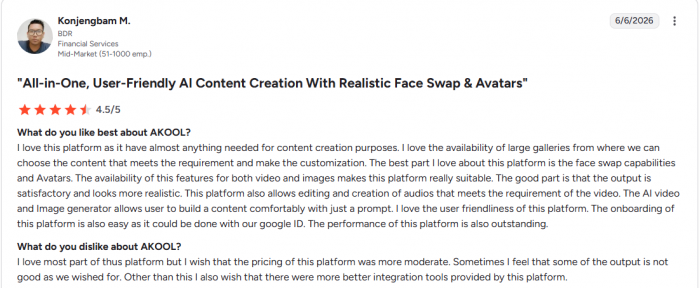
G2’s review summary says users praise Akool for ease of use and quick high-quality video creation, but some mention slow rendering for high-resolution outputs.
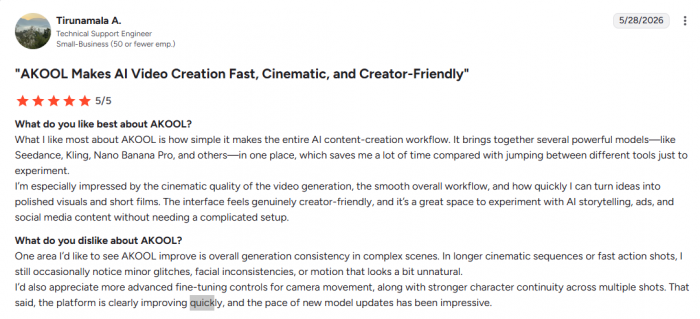
Capterra’s scores are positive, but the value-for-money score is lower than ease of use, which supports the concern around pricing and credits.
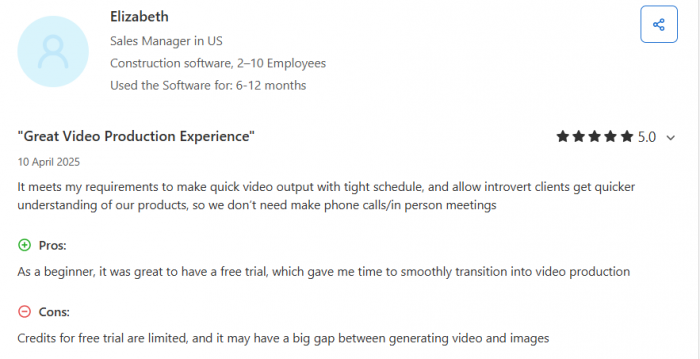
Trustpilot reviews include praise for talking photo, image-to-video, video swap, and ease of use, but also complaints about voice clone quality, credit issues, and pricing.
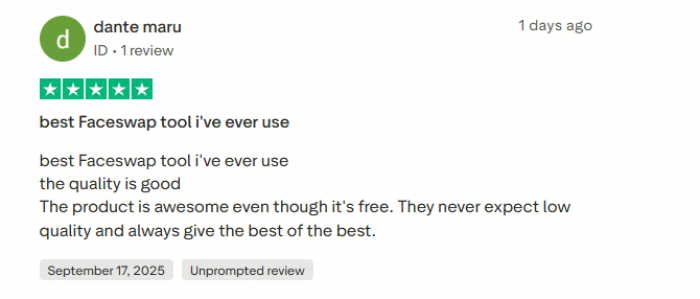
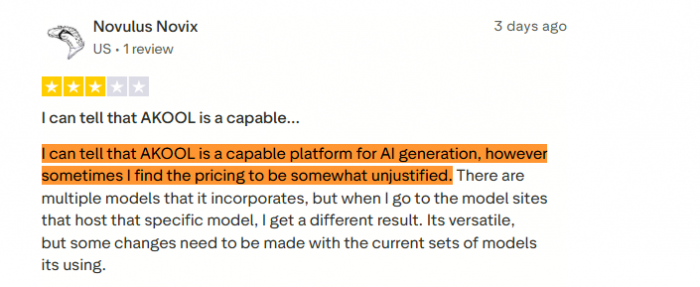
This does not mean Akool is unreliable. It means Akool is a strong tool with uneven expectations. Users who understand credits and test outputs first are more likely to be satisfied than users who expect perfect results from every model.
What Akool Does Well
Akool’s strongest advantage is that it combines multiple human-focused AI video workflows in one place. A creator can make an avatar video, translate it, generate an image, swap a face, animate a photo, or test a short AI video without jumping between five different platforms.
It is especially useful for:
● Marketing videos where speed matters more than cinematic detail.
● Internal training clips that do not need a real presenter.
● Product explainers that require a simple avatar or narrator.
● Social videos built around faces, characters, or talking photos.
● Multilingual video drafts for creators and global teams.
● Agencies that need quick concepts before final production.
Akool also has a practical advantage for users who dislike traditional editing software. The guided workflow lowers the barrier to entry. That is one reason review sites show strong ease-of-use feedback.
Where Akool Still Falls Short
Akool’s biggest weakness is not lack of features. It may actually have too many features for a new user. The platform covers avatars, video generation, face swap, translation, voice, background editing, and API access, but not every tool feels equally mature.
The credit system also needs careful planning. A user may see a monthly price and assume that is the real cost, but credits determine how much video can actually be produced. Regeneration, higher resolution, longer clips, and heavier models can change the real value of the plan.
The output quality is also input-sensitive. Akool performs well with clean portraits, stable videos, and clear scripts. It becomes less predictable with poor source material, complex prompts, or difficult face angles.
Another limitation is editing depth. Akool can help generate and assemble AI video content, but it is not a replacement for a full editing suite. Anyone who needs detailed scene control, advanced audio work, color grading, manual masking, or frame-level editing will still need another tool.
Best Use Cases for Akool AI
Akool makes the most sense for people who need fast, human-centered videos rather than advanced filmmaking control. It is better for practical production than experimental cinema.
The strongest fit is for marketers, educators, creators, agencies, and business teams that need repeatable video assets. For example, a marketing team can create product explainers. A training team can create onboarding videos. A YouTuber can localize videos into other languages. A social creator can make talking-photo clips or face-swap content.
Akool is less ideal for users who only need one narrow feature. If you only want face swap, a specialist face-swap tool may be cheaper. If you only want cinematic AI video, Runway or Kling may be stronger. If you only want enterprise training avatars, Synthesia may feel more focused.
Akool AI Alternatives Worth Comparing
HeyGen is the closest alternative for avatar videos and video translation. It is better if your priority is a clean avatar-first workflow.
Synthesia is stronger for corporate training, enterprise communication, onboarding, and structured business video production.
Runway, Kling, Pika, and PixVerse are better comparisons for cinematic text-to-video or image-to-video generation. They are more focused on visual storytelling and motion control.
Rask AI and ElevenLabs are stronger if translation, dubbing, or voice quality matters more than avatars and face swap.
Remaker AI, PixNova AI, and FaceFusion are better if the main need is face swap rather than a broader AI video suite.
This is the main point: Akool is not easy to compare with one tool because it covers several workflows. The right alternative depends on which Akool feature matters most.
Personal Rating
| Area | Score | Reason |
| Ease of Use | 8.0/10 | Simple once you choose the right tool, but the dashboard can feel crowded. |
| Feature Range | 8.4/10 | Strong mix of avatars, face swap, translation, talking photo, and video tools, though some overlap. |
| Output Quality | 7.5/10 | Good with clean inputs, but weaker with poor lighting, fast motion, or complex prompts. |
| Face Swap | 8.0/10 | One of Akool’s better tools, but quality depends heavily on face angle and footage quality. |
| Video Translation | 7.8/10 | Useful for localization, but still needs manual review before professional use. |
| Pricing Value | 6.8/10 | Paid plans look reasonable at first, but credit usage makes real cost harder to predict. |
| Editing Control | 6.5/10 | Fine for quick AI video creation, not strong enough for detailed post-production. |
| Overall Rating | 7.6/10 | Akool is useful and broad, but not equally strong across every tool. |
Final Verdict
Akool AI is a capable and broad AI video suite, but it should not be treated as a perfect all-in-one solution. Its strongest value is human-focused video creation: avatars, face swap, talking photos, video translation, and quick marketing-style content. It gives creators and teams many useful tools in one place, and user reviews on G2 and Capterra show strong satisfaction around ease of use and output speed.
The more critical side is pricing and consistency. The listed plan price is only the starting point because credits decide how much users can actually generate. Trustpilot feedback is also more mixed than G2 and Capterra, with visible complaints around credits, pricing, voice clone quality, and output expectations.
Akool is worth testing if you need a flexible AI video platform for presenters, faces, localization, and social or business content. It is not the best fit if you need deep editing control, highly cinematic AI video, or a simple flat-cost workflow with no credit calculation.
The best way to judge Akool is to run three tests before paying: one avatar video, one face swap, and one video translation. If those three outputs match your workflow and the credit cost feels acceptable, Akool can be a useful production tool. If not, a more specialized alternative may be a better investment.
Comments