

Gizmo AI has quickly built a reputation as the tool you install when you’re serious about exam prep but can’t face the grind of manually creating hundreds of flashcards. Instead of forcing learners to type every question themselves, it takes the raw chaos of modern studying PDFs, lecture slides, YouTube videos, typed notes and turns that into structured flashcards and quizzes wrapped in a gamified, spaced‑repetition system.
Seen from the outside, it looks less like “just another flashcard app” and more like a study infrastructure: something that quietly sits on top of a student’s entire content stack and converts it into daily recall sessions.
First Impressions: Designed For Overloaded Learners
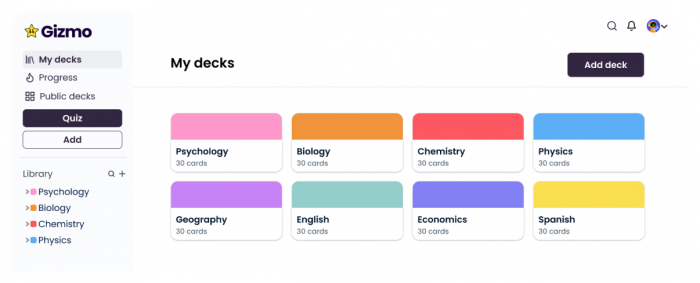
New users typically land on a clean dashboard that doesn’t overwhelm them with settings. The app quickly nudges them toward the core actions:
● Upload a PDF or slides
● Paste notes or web text
● Add a video lecture link
Within minutes, many learners find that Gizmo has already generated multiple decks from material that had been sitting unused in Google Drive or notebooks. The onboarding is simple enough that most students start practising on day one without needing tutorials or guides.
From an observer’s perspective, this “time to value” is one of Gizmo’s biggest strengths. It doesn’t ask users to design a system first; it asks them to hand over content and start answering questions.
Importing Content: Where Gizmo Earns Its Keep
The flagship feature and the reason many people try Gizmo in the first place is its ability to turn raw content into flashcards and questions.
How it works in practice
● Students upload textbooks, coaching PDFs, or lecture slides.
● Self‑learners paste transcripts or links to YouTube explainers and long‑form articles.
● The app parses these materials and generates question–answer pairs and flashcards.
For straightforward, theory‑heavy content, it has surprisingly good coverage: definitions, key facts, and exam‑style questions appear with very little manual effort. Video imports are particularly appreciated because they remove the need to pause and type every few seconds.
The necessary human layer
However, outside reviewers and students alike stress that this is not a “fire and forget” engine:
● Dense or poorly formatted PDFs can lead to shallow or oddly phrased questions.
● Technical subjects, especially those heavy on derivations, complex diagrams, or tricky edge cases often need human curation.
● The raw decks can sometimes be large; learners still need to prune, merge, and prioritise.
In other words, Gizmo eliminates a lot of manual labour, but it doesn’t completely replace judgment. The best results come from learners who treat AI‑generated cards as a first draft and then refine them. The bigger lesson is that generating flashcards faster does not remove the need to judge what deserves a place in the deck. The same tension shows up in Flashka AI, where PDFs and notes can become cards and quizzes quickly, but the quality of those questions still determines whether the saved preparation time translates into better revision.
Where Gizmo Works Best
Gizmo performs best when the material can be turned into clear questions and answers. Definitions, terminology, lecture notes, dates, processes and theory-heavy subjects fit naturally into its flashcard system.
The results are less dependable when learning relies on long calculations, visual interpretation or several connected reasoning steps.
| Study Material | Gizmo Fit | Why |
|---|---|---|
| Definitions and terminology | Strong | Easy to turn into direct recall questions. |
| Lecture notes and slides | Strong | Quickly converts larger notes into revision material. |
| History and theory | Strong | Facts, dates and concepts suit spaced repetition well. |
| Long PDFs | Mixed | Smaller sections usually produce more focused cards. |
| Maths and derivations | Mixed | Formulas work better than multi-step reasoning. |
| Diagram-heavy topics | Mixed | Important visual relationships may be lost in text cards. |
Gizmo therefore works best as a way to speed up revision preparation rather than replace deeper study. Let it handle the repetitive card creation, then check the material and spend more time on concepts that need explanation, calculation or visual understanding.
Public Deck Library: Studying Without Your Own Notes
Not every learner arrives with a folder of PDFs. For them, Gizmo offers a second entry point: a library of more than 1,000,000 free public flashcards made by other students, organised by educational level and subject.
In practice this covers:
● Common school and university subjects where a pre-made deck already exists.
● Standardised tests, language vocabulary, and professional certifications.
● A quick way to test the app before committing to any imports.
The usual caution applies. Community decks vary in quality and are written for someone else's syllabus, so they work best as a starting scaffold that you trim and add to, rather than a finished revision plan. Where the library shines is speed: a learner with no material can be practising within a minute of installing the app.
Study Modes: Flashcards, Quizzes, And Micro‑Sessions
Once content is imported and cards are generated, Gizmo shifts users into practice.
Flashcards mode
This mode keeps things traditional:
● Learners flip through question–answer cards.
● They mark whether they knew the answer or not.
● The system records performance quietly in the background.
This suits quick refreshes, definition‑heavy topics, and low‑energy study sessions. It’s also familiar enough that anyone coming from Anki or Quizlet can adapt instantly.
Quiz and game modes
Where Gizmo differentiates itself is in the quiz experience:
● Multiple choice, fill‑in‑the‑blank, and short questions are bundled into compact sessions.
● Each session comes with a limited number of lives. Too many errors ends the run.
● Streaks, progress bars, and subtle game mechanics keep learners engaged.
Observers note that this design almost turns studying into a series of “mini‑games” rather than long, intimidating blocks of revision. It’s common to see students open the app “just to keep a streak alive” and end up completing several focused sessions.
For exam‑oriented learners, this matters: the barrier to starting is often the biggest hurdle. Gizmo lowers that barrier by making sessions small, time‑boxed, and satisfying to finish.
Learning Engine: Spaced Repetition Without The Jargon
Underneath the polished interface sits a spaced‑repetition system that behaves similarly to well‑established tools but hides the complexity from the user.
From the outside, its behaviour looks like this:
● Cards answered incorrectly resurface quickly, sometimes even within the same session.
● Cards repeatedly answered correctly get pushed further into the future.
● Each day, learners are presented with a queue of “due” cards that represents what they are most at risk of forgetting.
Students who stick with Gizmo for a week or two typically experience :
● A noticeable reduction in time spent revising material they already know.
● Increased exposure to weak areas they might otherwise avoid.
● A more predictable sense of daily work: instead of “study this entire subject,” it becomes “clear today’s due cards and quizzes.”
For many, this is the first time spaced repetition feels accessible without tinkering with settings, intervals, or card types.
AI Tutor: More Than Memorisation
Gizmo's AI Tutor gives the app another layer beyond flashcards and quizzes. Students can choose a topic or use an existing deck, then ask the Tutor to explain the material through lessons, notes, flashcards, and AI-generated quizzes. It can also build lessons directly from PDFs, PowerPoints, YouTube videos, notes, photos, and recordings.
This is also where the line between a flashcard generator and a broader study assistant starts to blur. Unstuck AI approaches uploaded course material in much the same way, using it for explanations, summaries, flashcards, and quizzes. The useful distinction is not how many AI features are included, but whether they help a student move from simply recalling an answer to understanding why it is correct.
This works best when a student needs to understand a topic before memorising it. I would still double-check important explanations against course material, especially for technical subjects. Free users currently get five AI Tutor sessions per day, while Gizmo Unlimited removes that limit.
Gamification: Motivation With Some Real Substance
Gamification in learning tools often risks feeling superficial. In Gizmo’s case, it tends to play a more meaningful role because it attaches to real progress.
Key mechanics include:
● Lives: sessions end if too many mistakes are made, adding pressure and focus.
● Streaks: consecutive days of study are tracked and visually rewarded.
● Progress indicators: learners can see how close they are to finishing a deck or hitting a goal.
Feedback from real users suggests:
● Streaks are particularly effective at building daily habits, especially during exam seasons.
● The “lives” system nudges learners to slow down and think rather than spamming answers.
● Visual progress reduces the sense of drowning in an endless syllabus.
While no game mechanic can replace actual effort, in this case the design does help learners cross the psychological barrier between intention and action.
Studying With Others: Shared Decks, Leaderboards And Gizmo Live
Gizmo's game mechanics are not purely solo. The app lets you share decks with classmates and compete with friends on leaderboards, and Gizmo Live adds a real-time session mode where a group can review together through an invitation code.
Observed uses include:
● Study groups splitting a syllabus, with each member importing one chapter and sharing the deck.
● Friends using leaderboards as light accountability during exam weeks.
● Live sessions for a final group run-through the night before a test.
The social layer is optional and easy to ignore, which is probably the right call. For learners who find leaderboards stressful rather than motivating, the core spaced-repetition loop works exactly the same without them.
Rough Edges: Bugs, Limits, And Reality Checks
A balanced view of Gizmo has to acknowledge its drawbacks and pain points.
Commonly issues include:
● Performance under heavy load: very large PDFs, complex documents, or enormous decks can cause lags, stalled imports, or occasional app instability. Splitting content into smaller chunks is often recommended.
● Free tier constraints: the free plan is functional but tight, with limits on lives, decks, or sessions that can frustrate serious exam candidates. Many feel nudged towards paid plans once they try to use Gizmo for intensive study.
● Inconsistent card quality: while many AI‑generated questions are strong, some are too generic, trivial, or poorly focused. Learners who rely entirely on automation without reviewing decks may end up practising less relevant details.
● Always‑online dependence: the lack of a robust offline mode can be a deal‑breaker in areas with weak connectivity or for students who commute without data.
None of these issues are unique to Gizmo, but they do shape who benefits most from the tool. Learners who expect a flawless, set‑and‑forget system may feel disappointed; those who view it as a high‑leverage assistant tend to get better results.
Exporting Is Still Limited
Gizmo is much better at bringing study material in than moving it back out. Students can import content from tools such as Anki and Quizlet, but Gizmo currently does not offer a native way to export cards or complete decks.
That may not matter for short-term exam revision, but it is worth considering if you plan to build a large study library over several semesters. Your decks remain editable and shareable inside Gizmo, but moving them into another flashcard app is currently less straightforward.
Platforms And Cross-Device Sync
Gizmo is available on Android, iOS, and the web, and it syncs across platforms so you can learn wherever you are. In practice, most students import on a laptop and clear their daily queue on a phone.
Two details worth knowing:
● The mobile apps can scan handwritten notes and photos and turn them into flashcards and quizzes, so paper notes are not a dead end.
● Sync is cloud-based, which is what makes the cross-device experience seamless but also why the app depends on a connection.
For a student who moves between library, lecture hall, and bus, this flexibility is a quiet advantage over desktop-first tools, provided the connectivity caveat covered earlier fits their routine.
Safety, Privacy, And Transparency: The Trust Question
From an outsider’s perspective, the trust question is central when evaluating Gizmo. The platform handles personal notes and study materials, tracks performance data such as successes, failures, and behaviour patterns, and may also contain sensitive academic or work content if users are not careful. In this context, responsible reviewers stress several practical precautions. Learners should treat anything they upload as real data rather than harmless notes and should avoid including confidential or highly personal information.
As with any cloud-based edtech platform, users are advised to review the current privacy policy, data retention practices, and account deletion options before committing heavily. Gizmo’s overall design and behaviour are broadly in line with modern SaaS study tools: uploaded content is processed to generate flashcards and study schedules, and performance data is used to personalise practice.
The overall takeaway is that Gizmo is not uniquely risky compared to similar tools, but it still demands basic digital hygiene from its users.
Real User Sentiment: Patterns That Keep Emerging
Stepping back from marketing claims, user comments and narratives show clear patterns.
What users consistently praise
● Significant time savings in converting notes, PDFs, and lectures into flashcards.
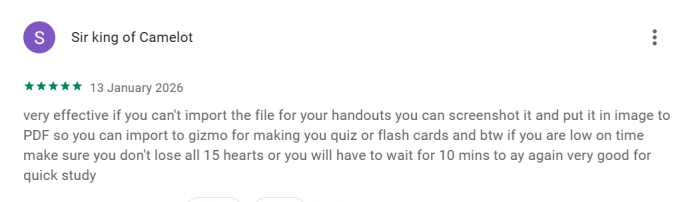
● Noticeable reduction in exam anxiety thanks to structured daily queues and visible progress.
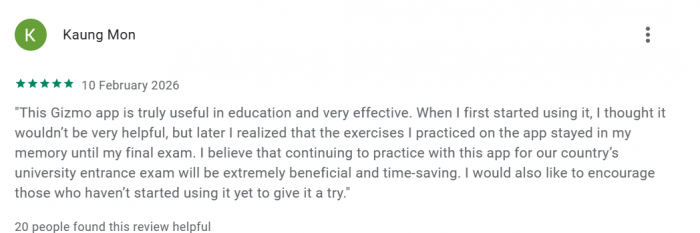
● A clean, modern interface that doesn’t require technical knowledge or deep configuration.
● The way streaks and short sessions make regular study more realistic.
What users consistently criticise
● Free plan limitations that make serious long‑term use difficult without paying.
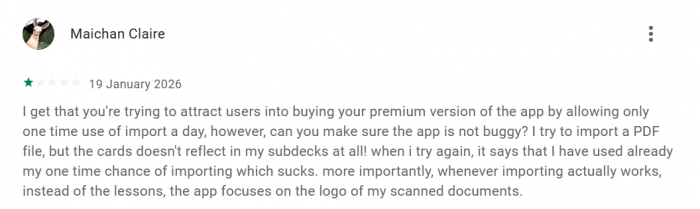
● AI occasionally generating low‑value or unfocused questions that must be manually filtered.
● Glitches or slowdowns when pushing very large or complex content through the system.
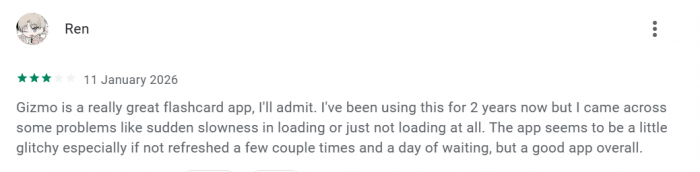
● The lack of offline functionality for learners with unstable internet.
These patterns suggest that Gizmo delivers best for learners willing to engage with it actively curating cards, planning imports, and investing in a paid plan during heavy exam periods rather than those seeking an effortless, fully automated experience.
Pricing And Value: Paying For Automation And Structure
Gizmo’s business model is familiar:
● A free tier to allow exploration of the core workflow and light usage.
● Paid tiers that unlock more imports, more generous study limits, and fuller analytics often with student‑friendly pricing options.
From a value perspective:
● For casual learners or those in early exploratory stages, the free tier can be enough to understand whether the app fits their style.
● For exam‑driven learners, the real question is whether the subscription fee is lower than the value of the hours saved and marks potentially gained.
Gizmo has a free plan, while Gizmo Unlimited starts at around $6.99 in the U.S. App Store. Gizmo also offers weekly and yearly subscription options, although the exact price can vary depending on your platform, region, and any student discount applied.
| Plan | Price | What You Get |
|---|---|---|
| Free | $0 | 5 AI Tutor sessions per day, limited Hearts and Hints, and a 20-minute wait between Magic Imports |
| Gizmo Unlimited | From $6.99 | Unlimited AI Tutor sessions, Magic Imports, Hearts, and Hints |
Viewed this way, users are not simply paying for “flashcards”; they are paying for a more comprehensive learning system. Gizmo automatically converts diverse types of content into usable practice material, reducing the manual effort typically required to create study resources. It also provides guided, evidence-aligned revision scheduling designed to optimise retention over time.
In addition, the platform offers a structured, gamified environment that helps support consistent daily study habits. Together, these features position the service as a full learning workflow rather than just a basic flashcard tool.
One Subscription Detail To Know
Gizmo Unlimited renews automatically, whether you choose a weekly or annual plan. The important detail is that deleting your Gizmo account does not automatically cancel an active subscription.
Cancellation needs to be handled separately through Gizmo, the App Store, or Google Play depending on where the subscription was purchased. After cancelling, premium access normally remains available until the current billing period ends.
How Gizmo Compares: Anki And Quizlet In The Same Picture
Gizmo, Anki, and Quizlet all cover flashcard-based studying, but they approach it differently. Gizmo puts more emphasis on turning existing study material into a ready-to-use revision system, while Anki prioritises control and Quizlet combines flashcards with a huge library of existing study sets.
| Area | Gizmo | Anki | Quizlet |
| AI card creation | Strong | Limited natively | Strong |
| Setup effort | Low | Higher | Low |
| Study control | Moderate | Very high | Moderate |
| Gamification | Strong | Minimal | Moderate |
| Best for | Fast AI-assisted revision | Long-term, customised study | Ready-made sets and flexible practice |
● Anki offers maximum control and transparency. It’s the tool of choice for power users who want to hand‑craft decks and tune everything. The cost is complexity and time.
● Quizlet offers a vast library of community decks and simple test modes. It’s ideal when studying common subjects where high‑quality, pre‑made sets already exist.
● Gizmo AI positions itself as the automation‑first option: it ingests whatever content a learner already has and builds a personalised, gamified revision environment around it.
In practical terms:
● Learners short on time but rich in content tend to gravitate toward Gizmo.
● Those who want long‑term, meticulously tuned decks often prefer Anki.
● Students needing quick, shared resources may lean on Quizlet.
A hybrid stack is common: Gizmo for rapid deck generation and habit‑building, Anki for long‑term retention of the most critical material, and Quizlet for social or ready‑made sets.
Final Assessment: What Gizmo AI Actually Changes
Viewed from the outside, Gizmo AI doesn’t fundamentally change what works in learning active recall, spaced repetition, and consistent practice remain the foundation. What it does change is the friction. By automating card creation, hiding algorithmic complexity, and packaging daily practice into small, game-like sessions, it makes evidence-based study methods far more accessible to learners who would never configure complex tools or manually create hundreds of cards.
Its limitations like occasional bugs, a tight free tier, imperfect AI, and online dependence are real, but they don’t erase its core value. For many students and professionals, Gizmo is best seen as a high-leverage assistant: not a replacement for thinking, but a strong ally in turning messy study material into a structured daily memory workout. For anyone currently overwhelmed by PDFs and playlists, it’s a tool worth testing seriously for a focused two-week trial rather than dismissing at first glance.

Benzie Graham
Sep 4, 2026I like the idea of Gizmo, but the AI flashcards can be pretty hit or miss. When I uploaded longer lecture notes, some cards focused on small details that weren’t really important for my exam so I still had to spend time deleting and editing them. It definitely makes creating flashcards faster but I wouldn’t study from a generated deck without checking the questions and answers first.
Login To Reply ↪