

Hypernatural AI is made for creators who want videos without opening a blank editing timeline. It turns prompts, scripts, images, characters, and audio into social-ready videos with visuals, narration, captions, timing, and style. That makes it useful for faceless YouTube Shorts, Instagram Reels, TikTok storytelling, educational explainers, product clips, and creator-led brand content.
The real question is not whether Hypernatural AI can generate videos. Many tools can do that now. The better question is whether it gives creators enough quality, control, pricing value, and safety clarity to use it regularly. This review breaks down its features, workflow, output quality, pricing, privacy, user sentiment, use cases, weak spots, and alternatives.
Hypernatural AI at a Glance
| Area | Details |
| Tool type | End-to-end AI video editor and script-to-video platform |
| Best for | Faceless videos, Shorts, Reels, storytelling, explainers, product clips |
| Key features | Text-to-video, script-to-video, AI characters, narration, captions, custom styles, B-roll, brand tools |
| Platform support | Web, iOS, Android, and mobile web |
| Free plan | Available, with stock-only video creation and up to 30-second videos |
| Paid pricing | Web pricing starts at $12/month for Creator, then $22/month for Pro and $48/month for Ultimate |
| Main strength | Turns an idea or script into a more complete video workflow |
| Main weakness | Credit limits, AI consistency, and less control than a professional editor |
What Kind of AI Tool Is Hypernatural AI?
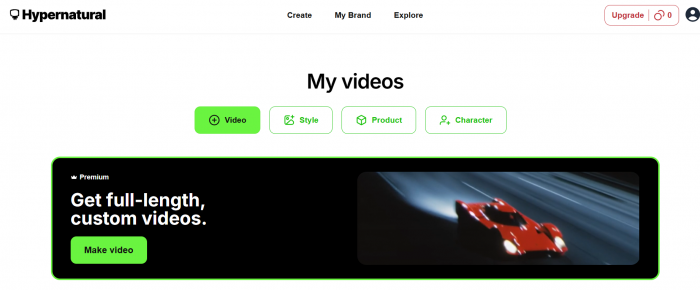
Hypernatural AI is more than a basic text-to-video generator. A standard generator may create a short clip from a prompt, while Hypernatural tries to manage a broader production workflow: script, scene structure, visuals, characters, narration, captions, branding, and export.
That makes it useful for creators who publish often but do not want to film, record, edit, caption, and format every video manually. It fits short-form content especially well because social videos often need speed, clear storytelling, and repeatable formats more than full cinematic control.
The platform’s feature set includes characters, custom styles, AI narration, captions, script-to-video, B-roll, animation, products, and brand tools. It is more complete than a raw AI clip generator, but less precise than professional editors like Adobe Premiere Pro, DaVinci Resolve, or Final Cut Pro.
Hypernatural also presents itself as a scaled creator tool. Its video marketing page says the platform has more than 2 million users, $9.2 million in total funding, and more than 5 million videos generated. That positions it beyond casual AI experimentation and closer to a creator, marketer, educator, and small-business workflow.
Key Features of Hypernatural AI
Text-to-Video and Script-to-Video
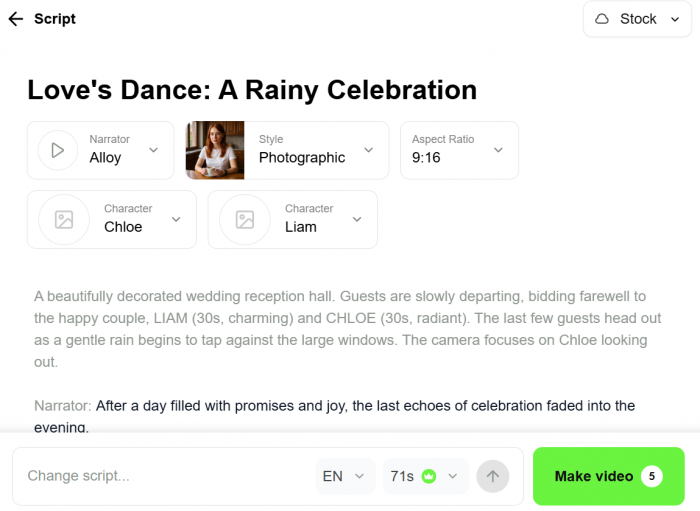
Text-to-video is the core feature. Users can paste a prompt, idea, or full script and ask Hypernatural to build a video around it. This works well for Shorts, Reels, TikTok explainers, product clips, and educational videos.
Script-to-video is usually the stronger use case. A finished script gives the AI a clearer structure, which helps the video feel less random. Hypernatural can turn narrator lines into scenes, match visuals to the text, and create something closer to a publishable draft.
AI Characters
Hypernatural includes character tools, which matter for storytelling and recurring content. Many AI video tools struggle with consistency because a person, mascot, or fictional character may change from one scene to another. Hypernatural’s character system is designed to help creators reuse characters across scenes and videos.
This is useful for story channels, educational explainers, brand mascots, fantasy content, and children’s-style videos. A small business could create a recurring brand character, while a history page could use a consistent narrator figure.
Custom Styles
The style system helps videos look more consistent. Creators can choose from visual styles or build a custom look that fits their content. This matters for social pages that want a recognizable identity across multiple uploads.
A motivational channel may want bold cinematic visuals, while a children’s story page may prefer soft illustration. A product brand may need cleaner visuals with less fantasy styling. Custom styles reduce the random look that AI videos often have.
AI Narration and Custom Voices
Hypernatural supports AI narration, with paid plans offering premium narrators and custom voice options. This is a key feature for faceless creators because voiceover is often one of the hardest parts of video production.
Creators can generate narrated videos without recording their own audio. This helps with Shorts, Reels, TikTok stories, explainers, product clips, and educational content. The limitation is that AI narration can still sound flat when a script needs strong emotion, humor, suspense, or human timing.
Captions and Social Formatting
Captions are essential for short-form video because many viewers watch without sound. Hypernatural includes AI caption tools, which makes the output more social-ready than a raw generated clip.
This is useful for TikTok, Instagram Reels, YouTube Shorts, and LinkedIn videos. A video with visuals but no readable captions often feels unfinished. Hypernatural reduces the need to move the file into another app just for subtitles.
AI B-Roll and Uploaded Media
Hypernatural can generate or insert supporting visuals based on the script, but it also allows uploaded images and video clips on paid plans. This is important when accuracy matters.
If a creator is making a product video, brand campaign, personal story, or educational explainer, uploaded assets can make the result more reliable than fully generated visuals. Paid plans also include HD exports, premium narrators, uploaded media support, and watermark removal.
Brand and Product Tools
The Pro and Ultimate plans add product and logo support, while Ultimate includes a brand feature. This makes Hypernatural more useful for small businesses, marketers, and agencies.
Still, brand use needs review. AI can speed up production, but it cannot fully replace approval. Product placement, logos, claims, and visuals should be checked before publishing, especially in ads or client campaigns.
How Hypernatural AI Works
Hypernatural’s workflow is built around speed. Instead of manually arranging footage on a timeline, users begin with a prompt, script, idea, image, audio file, or video clip. The AI then creates a video structure around that input.
| Step | What Happens |
| Add your input | Start with a prompt, script, idea, blog text, image, audio, or uploaded video |
| Choose the direction | Select visual style, narrator, characters, tone, and format |
| Generate the first draft | Hypernatural creates scenes, visuals, narration, captions, and timing |
| Edit the result | Adjust scenes, visuals, captions, narrator lines, pacing, and uploaded media |
| Export or publish | Download, share, or publish depending on plan limits and platform needs |
The workflow works best when the input is specific. A vague prompt like “make a cool video about productivity” may create a usable draft, but the result can feel generic. A better prompt includes structure, audience, tone, visual style, and target length.
For example, a creator making a YouTube Short about “three strange facts about ancient Rome” should add the script, desired tone, narrator mood, and visual style. Hypernatural can then break the script into scenes, match visuals to the story, add narration, and generate captions.
Its main advantage is production compression. You do not need separate tools for stock footage, voiceover, captions, scene structure, and export. Hypernatural brings most of that into one guided workflow.
Editing Control After Generation
Hypernatural is not a one-click-only tool. Users can edit the draft after generation, including scenes, visuals, timing, captions, and narrator lines. That matters because AI videos often need correction before they are ready to publish.
The editing layer helps creators refine videos without using a full professional editing suite. It also reduces waste because users can fix a draft instead of starting again every time.
Before export, check:
● Make sure every scene matches the script.
● Review captions for spelling, timing, and readability.
● Listen for mispronounced names or awkward voice timing.
● Replace weak AI visuals with uploaded assets when accuracy matters.
● Keep test videos short to avoid wasting credits.
● Fact-check informational scripts before publishing.
The limit is depth. Hypernatural gives guided editing, not frame-level control. For advanced sound mixing, manual animation, color grading, or exact timeline edits, traditional editing software is still better.
Output Quality: What the Videos Actually Feel Like
Hypernatural’s output is strongest when the content is short, visual, story-based, and not dependent on perfect realism. It works well for animated explainers, fictional stories, quick educational clips, social videos, brand teasers, and faceless narration formats.
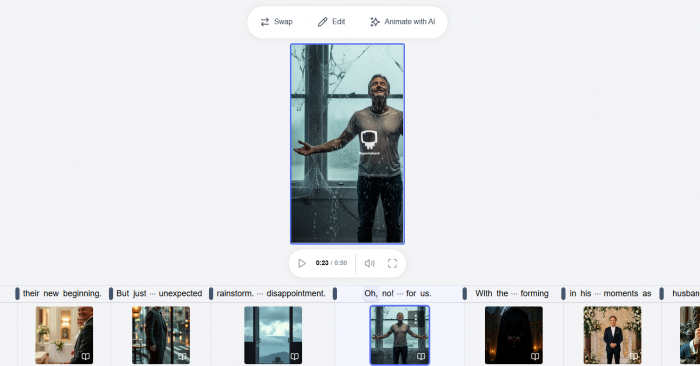
The videos can feel polished because Hypernatural combines scenes, voiceover, captions, visuals, and style in one workflow. For solo creators, that is valuable because the result feels closer to a finished post than a raw AI-generated clip.
Where it performs well:
● Faceless YouTube Shorts with narration and captions.
● TikTok-style storytelling videos.
● Educational micro-lessons and simple explainers.
● Fantasy, history, mythology, or fictional story formats.
● Product teasers and simple brand videos.
● Blog-to-video repurposing for social platforms.
Its weaker side is precision. AI-generated scenes may not always match the script. Characters and objects can vary. Voice emotion may not fit the mood. Longer videos may need more cleanup because small errors become easier to notice.
The best way to use Hypernatural is as a fast production assistant. It can create strong first drafts and publishable short videos, but creators should still review the output carefully.
Pricing and Credit System
Hypernatural offers a free plan and three main paid tiers on its web pricing page. The free plan is useful for testing, but it is limited to stock-only video creation, no custom voices, no custom characters, no products, no brands, no logos, videos up to 30 seconds, 6 basic AI narrators, and direct social export only.
| Plan | Price | Key Details | Best For |
| Free | $0/month | Stock-only creation, up to 30-second videos, 6 basic narrators | Testing the platform |
| Creator | $12/month | 6,000 credits/year, 1 custom voice, 4 custom characters, HD exports, no watermark | Solo creators |
| Pro | $22/month | 18,000 credits/year, 2 custom voices, 12 characters, 12 products, 12 logos | Frequent creators and small brands |
| Ultimate | $48/month | 96,000 credits/year, 4 custom voices, 48 characters, 48 products, 48 logos, 1 brand | Heavy users and brand workflows |
The key pricing detail is credits. A plan may look affordable, but the real value depends on how many videos you generate, regenerate, edit, and test. AI video creation usually involves trial and error, so style tests, scene remakes, longer videos, and narration changes can consume credits quickly.
For casual creators, the Creator plan may be enough. Daily Shorts creators, agencies, or brand accounts may need Pro or Ultimate. Before paying, it is better to test the free plan and estimate how many credits a normal workflow uses.
Users should also check the final payment screen. Web pricing and app-store pricing may differ by country, taxes, billing method, or store rules.
Privacy, Safety and Rights
Hypernatural is a creative AI platform, so uploads matter. Its privacy policy says the service may collect profile/contact data, payment-related data, device/IP data, web analytics, social network data, and sensory data such as photos, videos, or recordings that users choose to upload.
This matters because creators may upload faces, voices, personal clips, brand assets, product images, and social media content. A private video, client product demo, child’s face, or someone else’s voice is not just an input. It is sensitive material.
The terms say Hypernatural assigns users its rights in output content to the extent permitted by law, but the output may be machine generated and may include user submissions, third-party copyrighted works, or similarities to outputs generated for other users. Commercial users should not assume every AI output is risk-free for ads, clients, or monetized channels.
Important safety checks:
● Do not upload someone’s face, voice, or private footage without permission.
● Avoid celebrity likenesses or real-person impersonation.
● Use only logos, product images, music, and media assets you own or are allowed to use.
● Review AI visuals for factual or brand accuracy.
● Check terms before using outputs in ads, client work, or monetized videos.
● Be careful with children’s content, health claims, financial claims, legal topics, and news-style videos.
This does not mean Hypernatural is unsafe. It means users should treat it like a serious AI media tool and review inputs, rights, and outputs carefully.
What Real Users Praise and Complain About
Public feedback around Hypernatural is generally positive on ease of use, speed, and creativity. Users often praise it for making video creation simple, especially for people without editing experience. Some testimonials highlight storytelling, fantasy videos, animated videos, and text-based creation.
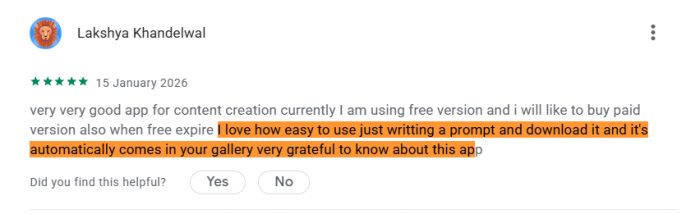
The strongest praise usually falls into four areas:
● The platform makes video creation easier for beginners.
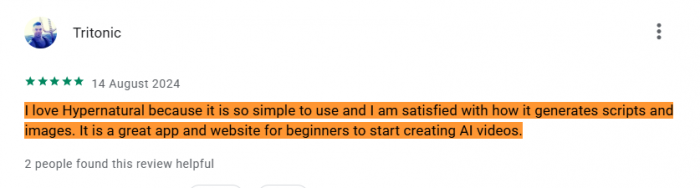
● It reduces the time needed to turn a script into a video.
● AI narration, captions, and visuals reduce the need for multiple tools.
● Storytelling and faceless content feel like natural use cases.
The complaints are more practical. Some users mention subscription expectations, credit usage, and refund frustration. This is common with credit-based AI tools because users may expect a subscription to cover more experimentation than it actually does.
Common complaint areas include:
● Credits may run out quickly during heavy testing.
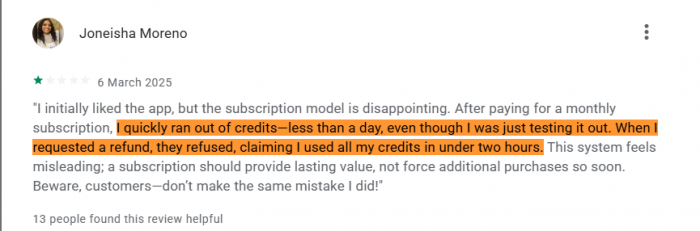
● Regenerating scenes can increase real usage cost.
● Subscription terms should be checked carefully.
● AI visuals may not always match the script.
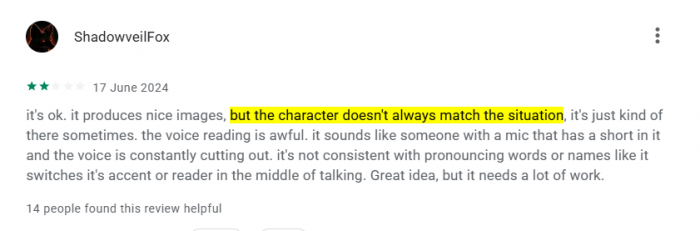
● Professional editors may find the tool too automated.
● Refunds may depend on whether the purchase was made through the web, App Store, or Google Play.
The takeaway is clear. Hypernatural seems well liked for speed and creativity, but users should test the workflow, understand the credit model, and check billing terms before using it for daily publishing.
Real Use Cases for Hypernatural AI
Hypernatural is strongest when the goal is to create short, repeatable, visually engaging videos without filming from scratch. It fits creators who have scripts or ideas but do not want to manage the full production pipeline manually.
| Use Case | How Hypernatural Helps |
| YouTube Shorts | Turns short scripts into narrated, captioned videos |
| Instagram Reels | Creates vertical social videos with visuals and captions |
| TikTok storytelling | Builds character-led or fact-based short videos |
| Blog-to-video | Converts written sections into short visual clips |
| Product explainers | Creates simple marketing videos using products, logos, and narration |
| Education | Turns lessons, facts, and concepts into visual explainers |
| Brand mascot content | Uses recurring characters and styles across multiple videos |
Faceless creators are one of the clearest audiences. A creator can write a short script, choose a narrator, apply a style, generate scenes, review captions, and export a social-ready video much faster than building everything manually.
Small businesses may also find value in the Pro or Ultimate plans because of product, logo, and brand features. A restaurant, online store, coach, agency, or local service provider could use Hypernatural to create simple promo videos without hiring a video team for every post.
Educators and storytellers can use it for short lessons, illustrated explainers, mythology stories, historical summaries, or children’s-style narratives. The main caution is accuracy. If the content is factual, the script and visuals should be checked before publishing.
Where Hypernatural AI May Not Be the Best Fit
Hypernatural is strong, but it is not built for every video workflow. It prioritizes speed and AI-assisted production over full manual control.
It may not be ideal for high-end cinematic videos because creators cannot control every camera move, lighting choice, animation detail, or edit point. It may also feel limited for long-form YouTube videos, where pacing, scene variety, audio quality, and visual continuity need more detailed work.
For technical tutorials, screen-recording tools are usually better. If the goal is to show a software walkthrough, dashboard, coding process, or product interface, real screen capture is more accurate than AI-generated scenes.
For news, legal, medical, financial, or sensitive educational content, the main risk is visual misrepresentation. AI may create a scene that looks convincing but does not accurately represent the topic. In those cases, verified images, original footage, or neutral visuals are safer.
Prompting Tips for Better Hypernatural AI Videos
Better prompts usually lead to better outputs. Hypernatural can generate from a simple idea, but creators get stronger results when they provide structure.
Useful prompting tips:
● Write scripts in short scene-friendly blocks.
● Define the audience, tone, and platform before generation.
● Mention the visual style clearly.
● Use one consistent character for story-based videos.
● Upload your own assets when accuracy matters.
● Keep test videos short before spending credits on longer versions.
● Review captions and voice timing before exporting.
● Avoid vague prompts like “make it viral” or “make a cool video.”
A stronger prompt might say: “Create a 45-second vertical video for YouTube Shorts. Tone: mysterious but clear. Style: cinematic historical illustration. Topic: three strange facts about ancient Rome. Use short scenes, bold captions, and a calm documentary narrator.”
That kind of prompt gives Hypernatural a clearer production brief. It does not guarantee perfection, but it reduces random output and makes editing easier.
Best Alternatives to Hypernatural AI
If Hypernatural does not fit your workflow, the best alternative depends on the type of video you want to create.
For marketing and template-heavy videos, InVideo AI is a strong option because it focuses on social video production, stock assets, and marketing workflows. For narration-heavy content, Fliki is useful because it is built around text-to-video and voiceover creation. For turning blogs and long written content into short videos, Pictory is one of the more direct alternatives.
HeyGen and Synthesia are better choices for presenter-style avatar videos, especially for training, onboarding, sales explainers, or corporate communication. Canva is better for creators who want manual design control, brand templates, and easier editing across social assets. Runway, Pika, Kling, and similar tools are stronger for experimental AI visuals or cinematic prompt-to-video clips.
Hypernatural’s advantage is the middle ground. It is more complete than a raw clip generator, easier than a traditional editor, and more story-focused than many template-based tools.
My Personal Rating
| Feature | Rating | Note |
| Text-to-Video | 7.4/10 | Good drafts, but prompts matter. |
| Script Workflow | 7.6/10 | Stronger with clear scripts. |
| AI Characters | 6.8/10 | Useful, but consistency varies. |
| Narration | 7/10 | Good, but needs voice review. |
| Captions | 7.3/10 | Helpful, but check timing. |
| Editing | 6.3/10 | Basic, not advanced. |
| Brand Tools | 6.5/10 | Useful, but needs approval. |
| Overall | 6.9/10 | Best as a fast video drafting tool. |
Final Verdict
Hypernatural AI is a strong AI video creation platform for creators who want to turn scripts, ideas, characters, and visuals into short-form videos quickly. Its real value is the full workflow: script-to-video, AI narration, captions, characters, custom styles, editing, uploads, and social-ready output.
It is best for faceless content, storytelling videos, educational explainers, social media clips, product promos, and creator-led short-form publishing. The tool is fast, approachable, and more complete than many basic text-to-video generators.
The main limitations are credit usage, AI consistency, and editing depth. Users should not expect perfect realism or professional timeline control. They should also check privacy, upload rights, and commercial-use terms before using it for client work, paid ads, or monetized channels.
For casual creators and small teams, Hypernatural AI is worth testing on the free plan. For regular creators, the paid plans become more practical because they unlock custom voices, characters, uploads, HD exports, and watermark-free videos. The best way to use Hypernatural is as a fast AI production assistant that can turn a strong script into a publishable video much faster than a manual editing workflow.
Comments