

Indown.io looks like the kind of website people open when they need one quick Instagram download and do not want to install an app. I used it across Reels, video posts, photos, Stories, profile pictures, highlights, and private-content support to see where it actually works well and where the experience starts to feel risky or limited.
Indown.io at a Glance
| Area | Details |
| Tool type | Web-based Instagram downloader |
| Main use | Downloading Instagram Reels, videos, photos, Stories, DP, and highlights |
| Account needed | No account needed for normal public downloads |
| Login required | No Instagram login required for public content |
| Private account support | Available through a separate private downloader workflow |
| Pricing | Appears free for core browser-based downloads |
| Best use case | Saving your own Instagram content or public content for personal reference |
| Main concern | Private-content use, copyright risk, and inconsistent quality expectations |
Indown.io is not an AI tool, social media manager, video editor, or content repurposing platform. It is a simple Instagram downloader. That matters because the tool should be judged by how quickly and cleanly it handles link-based downloads, not by whether it offers advanced editing, analytics, or creator workflow features.
First Impression and Interface Experience
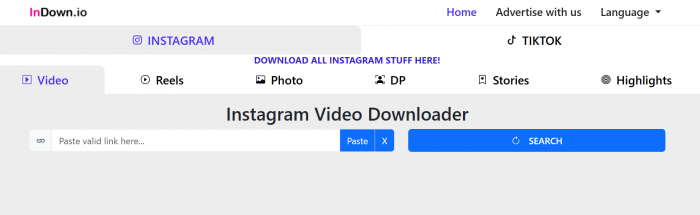
My first impression of Indown.io was that it is built for speed rather than polish. The homepage does not feel like a heavy SaaS dashboard. There is no onboarding screen, no account wall, no complex settings panel, and no long setup process. The main action is visible quickly: paste an Instagram link into the download box and wait for the tool to fetch the media.
That simplicity is useful. I did not need to create an Indown.io account, verify an email, connect Instagram, or install a browser extension for public downloads. For Reels, photos, public videos, Stories, and DP checks, the experience felt like a direct web utility rather than a full product.
The interface is not premium-looking, but it does not need to be. Most users coming to a downloader site want one thing: a working download button. Indown.io keeps the workflow close to that. The downside is that the site does not give much reassurance beyond the basic tool flow. There is no detailed user dashboard, download history, visible support center, or advanced file settings.
What I noticed quickly:
● The public downloader flow does not ask for an Instagram login.
● The site works through a normal browser window.
● The download box is easy to understand.
● The experience feels better for one-off downloads than repeated professional use.
● The private downloader area feels very different from the public tools and needs more caution.
This first impression shaped the rest of my test. Indown.io feels convenient, but not deeply polished. It is easy to start using, but it does not feel like a professional platform built for long-term content management.
How I Tested Indown.io
I tested Indown.io the way most users would actually use it. I copied Instagram links, pasted them into the relevant Indown.io box, waited for the result, and checked whether the downloaded file was usable.
I did not judge the tool only by whether a button appeared. I looked at the full experience: how easy the page was to use, whether the result made sense, whether the file quality was acceptable, and whether the feature raised any privacy or ethical concerns.
| What I Tested | What I Wanted to Know | My Experience |
| Public Reel | Can it quickly save a Reel? | This was the smoothest test |
| Video post | Does a regular Instagram video download properly? | Worked for casual saving |
| Photo post | Does the downloaded photo remain clear? | Usable when the source image was good |
| Story | Can it handle temporary Story content? | More variable than posts and Reels |
| DP / profile picture | Can it open and save a clearer profile image? | Useful for quick viewing |
| Highlights | Can it save highlight content? | Depends on account and availability |
| Private content | Is private-account downloading applicable? | Technically supported, but risky and sensitive |
What Indown.io Claims to Download
Indown.io supports the main Instagram content types people usually search for: Reels, videos, photos, Stories, profile pictures, and highlights. It also has a separate private downloader feature, which should not be mixed with the normal public download experience.
The public tools follow the same basic pattern. Copy the Instagram link, paste it into Indown.io, and download the available media. That is the part of the site that feels most natural. The private downloader is different because it moves the user into a more sensitive area involving account access, page source, and content that was not shared publicly.
Test 1: Downloading an Instagram Reel
The Reel downloader gave me the cleanest experience. I copied a public Instagram Reel link, pasted it into Indown.io’s Reel download box, and waited for the result. I did not have to log in, create an account, or connect Instagram.
The download flow felt quick and beginner-friendly. This is probably the strongest use case for Indown.io because Reels are exactly the kind of content users often want to save for offline viewing or personal reference. The tool did not make the process feel technical.
The result was usable, but not magically better than the original Reel. This is important. Indown.io can fetch the available video file, but it does not enhance sharpness, fix bad lighting, clean audio, or restore detail lost through Instagram compression.
My Reel result: It worked well for saving a public Reel, but the output quality depended completely on the original upload.
Test 2: Downloading a Regular Instagram Video Post
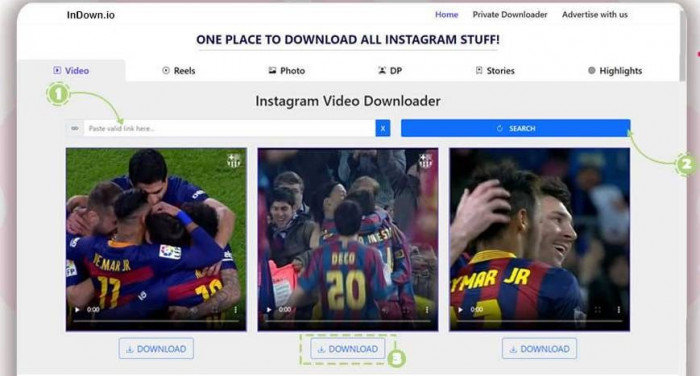
Next, I tested a regular Instagram video post. The process felt almost the same as the Reel test: copy the post link, paste it into Indown.io, wait for the file, and download it.
This also worked for casual saving. The downloaded video played normally and was good enough for offline reference. I would not call it a professional export because Indown.io does not let users choose resolution, format, bitrate, or audio settings.
That limitation is not surprising, but it should be mentioned. If someone wants to save a video for personal use, Indown.io is practical. If they want to prepare content for republishing, editing, or client work, the tool does not provide enough control.
My video post result: It worked, but the tool felt like a basic downloader, not a controlled video export solution.
Test 3: Downloading an Instagram Photo
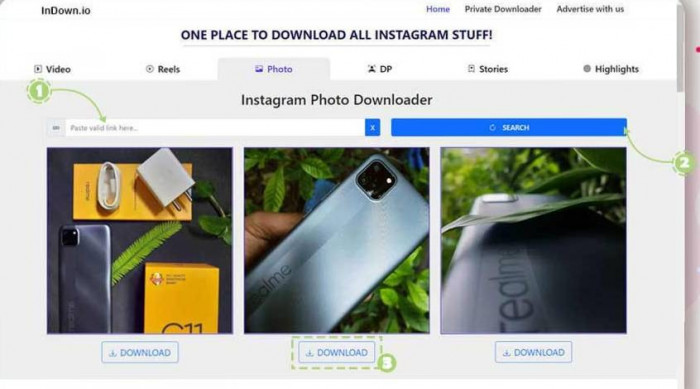
The photo test was simple. I copied the link of a public Instagram photo post, pasted it into the photo downloader, and saved the image once Indown.io fetched it.
The image looked usable because the original post was clear. This is where Indown.io can be helpful for saving reference images or backing up your own Instagram posts. The process was faster than taking a screenshot and cleaner than cropping an image manually.
Still, the output should not be confused with an original high-resolution camera file. Instagram compresses images before they are shown publicly. Indown.io does not reverse that compression. If the uploaded post is already cropped, compressed, or low-detail, the downloaded version will reflect that.
My photo result: It was useful for saving a visible Instagram image, but not suitable as a replacement for an original source file.
Test 4: Downloading an Instagram Story
The Story downloader felt less predictable than the Reel and photo tools. That is not only an Indown.io issue. Stories are temporary, profile-dependent, and often more tightly connected to Instagram’s live interface.
I tested it with accessible Story content. The workflow still followed the same link-paste-download pattern, but the experience felt more dependent on whether the Story was currently available and easy for the tool to fetch.
The output was usable for personal viewing, but Stories are not always clean downloads. They may contain stickers, text overlays, music, polls, or interactive elements. Once downloaded, those elements may not feel the same as they do inside Instagram.
My Story result: It can work for accessible Stories, but this is not the most reliable or cleanest part of the tool.
Test 5: Downloading Instagram DP / Profile Picture
The DP feature was one of the easiest to understand. I used an Instagram profile link to check whether Indown.io could open or download the profile picture more clearly.
This feature makes sense for users who want to view a profile image without taking screenshots. It is fast, simple, and does not require the same processing time as video downloads.
The result was useful, but the quality still depended on the original DP. Instagram profile pictures are often cropped, compressed, and uploaded at smaller sizes. Indown.io can help view or save the image, but it cannot turn a small profile picture into a sharp professional portrait.
My DP result: Useful for quick viewing and saving, but not a quality upgrade tool.
Test 6: Downloading Instagram Highlights
Highlights needed a separate test because they are saved Story collections, not normal posts. I checked whether Indown.io could handle highlight-style content and whether the experience felt as stable as downloading a Reel or photo.
The result was more conditional. If the highlight content is public and accessible, the tool can be useful. But highlights still carry the same limitations as Stories. They can be compressed, vertical, edited with stickers, or dependent on profile visibility.
I would not describe highlights as the smoothest Indown.io feature. It can help, especially when saving your own highlights, but the experience may vary more than simple public post downloads.
My Highlights result: Useful when the highlight is accessible, but more dependent on profile visibility and Story-style limitations.
Does Indown.io Work for Private Instagram Accounts?
Indown.io does offer a private downloader workflow, so private-account content is technically part of its feature set. But this is the part of the tool I would discuss very carefully.
The private downloader is not like downloading a public Reel. It appears to depend on the user already having access to the private content in their browser. That means it should not be presented as a tool to bypass Instagram privacy. It is more accurate to say that Indown.io provides a method for saving private content that the user can already view.
Even then, this is the highest-risk area of the tool. Private Instagram content is private because the account owner chose a limited audience. Downloading it without permission can create privacy, consent, and trust problems, even if the person downloading it was already allowed to view it.
In my article, I would not treat the private downloader as a normal convenience feature. I would frame it as technically available but ethically sensitive. Users should only use it for their own content or when they have clear permission from the person who posted it.
My private account result: Private downloading is applicable in a technical sense, but it is not something I would recommend for casual use.
Output Quality: What I Noticed After All Tests
The output quality was best when the original Instagram content was already clean. Public Reels and video posts were usable. Photos looked fine when the source post was sharp. DP downloads were helpful for viewing. Stories and highlights were more variable because they are compressed, temporary, and often built with Instagram-native overlays.
The main thing I noticed is that Indown.io does not control quality in the way an editing or export tool would. It does not ask what resolution I want. It does not provide enhancement options. It does not upscale videos, sharpen images, or clean audio.
That is not necessarily a weakness if the user understands the category. Indown.io is useful for saving content. It is not built to improve content.
Is Indown.io Free?
Indown.io appears to be free for its main browser-based downloading features. During the public download flow, I did not need to buy a plan, create a paid account, or unlock a subscription page before testing the basic functions.
That said, the lack of a clear paid structure also means users should keep expectations realistic. Free downloader tools usually do not offer the same support layer, service guarantees, account dashboard, or reliability promise that comes with a paid product.
For me, the pricing experience felt simple: open the site, paste the link, and use the downloader. But I would still describe the pricing as “appears free” rather than making a stronger claim about the long-term business model.
Privacy and Safety Experience
For public downloads, Indown.io felt safer than tools that ask users to connect their Instagram account. I did not need to provide an Instagram username, password, email address, or platform login for regular public content. That is a major advantage.
However, users should not confuse no-login with no-risk. A third-party downloader still receives the pasted URL. The site may use ads, scripts, or external services. Like many free web utilities, it can also change over time.
The safest way to use Indown.io is to keep the use case narrow: download your own posts, save public content for personal reference, and avoid sensitive or private links unless you fully understand the implications. I would not enter Instagram credentials into any downloader site, and I would be especially careful with private-content workflows.
Legality and Ethics
Indown.io makes downloading easy, but it does not make every download legally or ethically safe. This is the part users often ignore.
Downloading your own Instagram Reel is different from downloading someone else’s video and reposting it elsewhere. Saving a public photo for personal reference is different from using that image in an ad, article, thumbnail, or client project. Crediting the creator is not always enough because credit is not the same as permission.
| Use Case | Risk Level |
| Downloading your own Instagram content | Low |
| Saving public content for personal reference | Moderate |
| Reposting someone else’s content with credit | Risky |
| Using downloaded media in commercial work | High |
| Downloading private content without permission | Very high |
My simple rule after testing the tool is this: Indown.io should be used as a personal-saving utility, not a shortcut for taking content from creators.
Public Reviews and User Sentiment
Public review data around Indown.io is limited, so I would not make exaggerated claims about user trust. It appears in some software listings and downloader discussions, but it does not have the deep review base of larger creator tools.
The user sentiment pattern is easy to understand. People like tools like Indown.io because they are fast, free-looking, and easy to use. The complaints usually come from the same areas: quality expectations, reliability changes, limited transparency, and confusion around downloader safety.
Based on my test, that public sentiment makes sense. Indown.io is useful when it works, but it is not the kind of tool I would describe as deeply verified or professionally supported.
Indown.io Strengths
Indown.io’s biggest strength is that it removes friction. I did not have to learn a new system, install anything, or create an account just to save public Instagram content. For quick Reel, video, photo, and DP downloads, that simplicity matters.
The second strength is format coverage. It is not limited to only Reels. The site also covers photos, Stories, profile pictures, highlights, and private downloader support. That makes it more complete than many single-page Instagram downloader tools.
The third strength is accessibility. Since it runs in a browser, it works as a quick utility for desktop and mobile users. It is especially useful when the goal is a one-time download rather than a full content workflow.
Indown.io Limitations
The biggest limitation is that Indown.io gives users very little control over the final output. I could download available files, but I could not choose advanced quality settings, change formats, improve sharpness, or clean audio.
The second limitation is consistency. Public Reels and photos felt more straightforward. Stories, highlights, and private-content support were more dependent on access, timing, and profile visibility.
The third limitation is trust depth. Indown.io is easy to use, but it does not feel like a full professional product with a detailed support system, transparent company identity, user dashboard, or long-term reliability promise.
The fourth limitation is private content. It may be technically supported, but it is the area where the ethical and privacy risks are highest.
Best Indown.io Alternatives
If you want tools similar to Indown.io, the closest alternatives are other browser-based Instagram downloaders. These are more relevant than video editors or general creator apps because they solve the same problem: saving Instagram media from a link.
| Alternative | Best For | How It Compares With Indown.io |
| SnapInsta | Reels, videos, photos, Stories, and IGTV-style downloads | One of the closest alternatives with a similar paste-link workflow |
| FastDL | Fast Instagram photo, video, Reel, and Story downloads | Similar simple interface and public-content focus |
| iGram | Instagram videos, photos, Reels, albums, and Stories | Good option for users who want another clean Instagram downloader |
| SaveInsta | Instagram Reels, videos, photos, Stories, and profiles | Very similar category with broad Instagram format support |
| Toolzu Instagram Downloader | Reels, videos, photos, Stories, and profile content | More tool-based layout, useful for users who want multiple Instagram utilities |
| Inflact Instagram Downloader | Instagram photos, videos, profiles, Stories, and highlights | More polished tool ecosystem, but may push users toward paid services |
| StorySaver.net | Instagram Stories and highlights | Better if the main need is Story-focused downloading |
| SaveClip | Instagram and social video downloads | Useful for simple media saving across supported platforms |
Among these, SnapInsta, FastDL, iGram, and SaveInsta are the closest direct alternatives to Indown.io. They follow the same basic idea: copy an Instagram link, paste it into the tool, and download the media. StorySaver is more useful if Stories are the main focus, while Inflact and Toolzu feel more like broader Instagram utility platforms.
Who Should Use and Avoid Indown.io?
Indown.io is best for users who want a quick way to save public Instagram content without creating an account. It makes sense for saving your own Reels, backing up public posts, downloading a photo for reference, viewing a DP more clearly, or saving accessible Stories and highlights.
It is also useful for people who only need occasional downloads. If you do not want a full software setup and only need a browser-based tool for quick saving, Indown.io fits that use case.
Indown.io is not ideal for users who want professional-quality exports, bulk downloading, editing tools, account libraries, or guaranteed long-term reliability. It is also not the right tool for people who want to reuse downloaded content commercially.
Users should also avoid treating the private downloader as a casual feature. If the content is private, permission matters. Access does not automatically mean the content should be saved or shared.
Final Verdict
After testing Indown.io across Reels, regular videos, photos, Stories, DP, highlights, and private-content support, I found it most useful for public Instagram downloads. Reels, video posts, photos, and DP downloads were the clearest use cases. Stories and highlights were more variable, and private-account downloading was the part that needed the most caution.
The best thing about Indown.io is how quickly it gets users from link to download. The weak point is that it does not offer much control, quality improvement, support depth, or ethical protection. It saves media, but it does not solve ownership, permission, or reuse rights.
Indown.io is worth using if you need a simple downloader for your own Instagram content or public content saved for personal reference. It is not a tool I would use for copying creators, reposting private content, or building a professional content workflow.

george halbart
Sep 2, 2026The browser-based approach makes sense for occasional tasks where you don't want another app. I use the same idea with [url=https://onlinebilllesco.pk/]this convenient billing resource[/url] and [url=https://onlinebillgepco.pk/]this useful utility portal[/url].
Login To Reply ↪